Not all trades in the market are equal. Hundreds of thousands of small trades happen every day — they're the background. Direction usually comes from the large participants: funds, algorithms, professionals whose positions aren't measured in single lots. The problem — you can't see them on a normal chart. Price just moves.
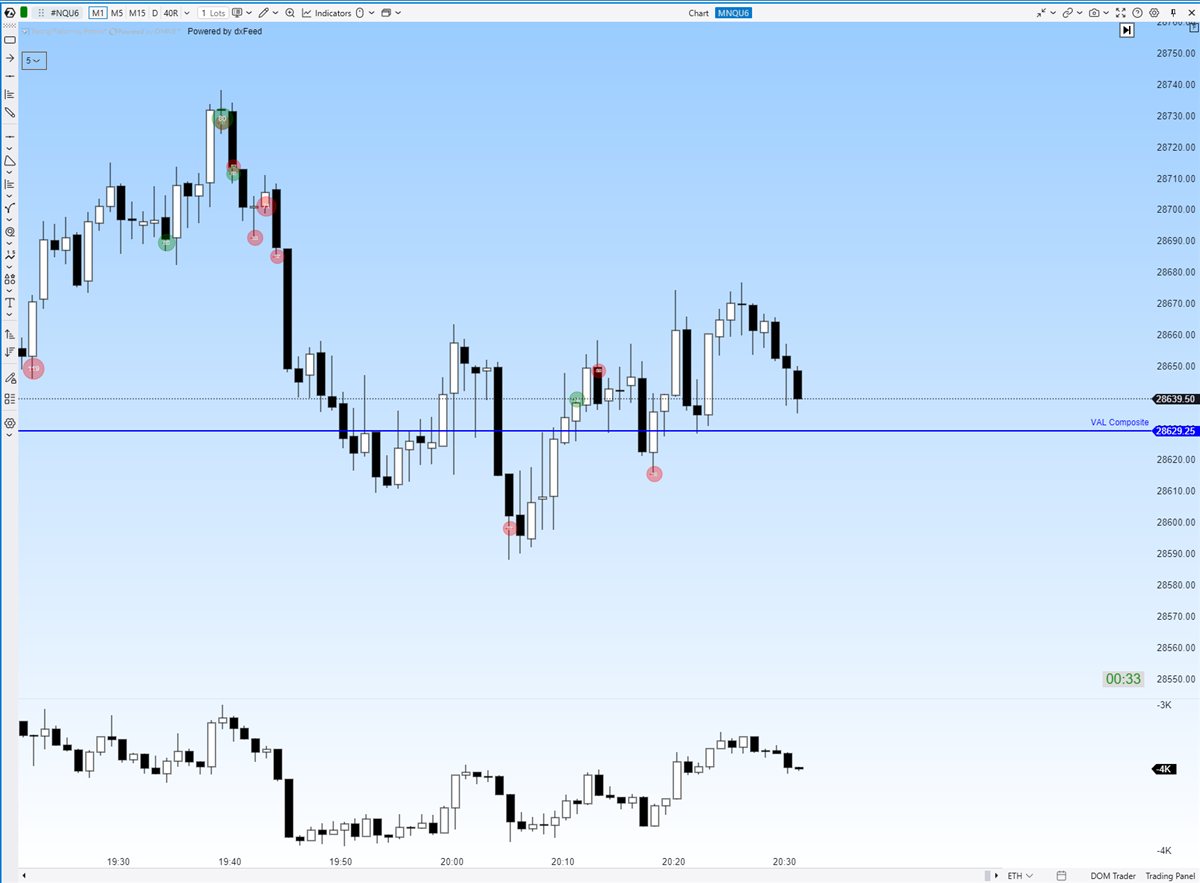
Big Trades is the ATAS indicator that solves exactly that: it marks large transactions right on the chart, the second they happen. The footprints of big money become visible.
What is Big Trades?
It's a filter that watches the full stream of trades (time & sales) and visually highlights the ones above the size you set. Marks appear on the chart — usually circles: size shows the trade's volume, colour shows the direction (buy or sell).
The difference from Footprint: footprint aggregates all volume at price levels, while Big Trades highlights individual exceptional events. One is the overall picture, the other is an event log.
How to set the filters
The most important setting is the minimum trade size. There's no universal number: every instrument has its own "normal" size, and it changes with the time of day too.
- Filter too small — the chart fills up with marks and you're looking at noise again, just prettier.
- Too large — a mark appears once an hour and the tool is useless.
- Calibration: note your instrument's typical large trade in a quiet market and in an active session. Set the filter so marks are rare but meaningful — exceptional events, not background.
What large trades mean at levels
The mark itself means nothing yet. Meaning comes from location and reaction:
- A large buy at support, price holds — someone is defending the zone. In auction language: value is being accepted here, and a buyer is taking on risk visibly.
- A series of large buys, price climbing — initiative with force behind it. The move has fuel.
- Large buys at the extreme, price stops rising — suspicious. Someone's buying everything… or is someone calmly selling to those big buyers? That's the absorption scenario — often seen before a turn.
- A large trade into a liquidity wall (see Heatmap) — a direct duel. Watch who wins: the aggressor or the wall.
When Big Trades misleads: one large trade ≠ market direction. A big buy can be a short being covered. Big players are wrong too. And not every big player shows their cards — some split orders into small pieces (icebergs). So Big Trades is always read in context: where the auction is, where value is, how price reacts.
What does it give you?
- It filters the noise. Instead of every trade, you see only the ones that can move the market.
- It shows participants, not lines. "Support is holding" becomes "here's who is holding it."
- It helps you read duels. At key zones you see when serious money steps in.
- An easy entry into orderflow. Of all the tools, this one is the most intuitive — a good first step before footprint.
How to start in ATAS
- Get the ATAS demo (14 days free).
- Add the Big Trades indicator to your chart.
- Calibrate the minimum size for your instrument — marks should be rare.
- Watch only the spots near important levels: who trades big there and how price reacts.
Try ATAS for free
Big Trades, Footprint, Heatmap and Volume Profile — professional orderflow tools in one platform. 14-day demo.
FAQ
What is the right filter size?
It depends on the instrument and time of day. There's no universal number — calibrate so you only see exceptional trades, not background.
Does a big trade mean price will move that way?
No. One trade is one participant — and they may be closing a position, or simply wrong. Meaning comes from location, context and the price reaction.
How is Big Trades different from Footprint?
Footprint aggregates all volume at levels, Big Trades highlights individual large trades. Overall picture vs exceptional events — they work best together.
Can I try it for free?
Yes — the ATAS demo runs 14 days, link above.
Want the full foundation?
Leave your email on the homepage — you'll get the Market Auction Theory summary (PDF) and be first to know when the course opens.